Grafana Reporting Tools Comparison (2026): Native Grafana vs Third-Party Solutions
Comparing Grafana Reporting Tools: What This Guide Covers
Professional Grafana reporting is now a core need for modern data teams. Dashboards are great for live monitoring. However, they do not scale as a reporting solution. Stakeholders want static files they can share. They also want to track how things change over time. Exporting PDFs or sending screenshots before every meeting creates a bottleneck. That bottleneck gets worse as your team grows.
Sharing data outside engineering teams adds more friction. Managers rarely log in to read charts. Clients find dashboard filters confusing. Auditors will not accept screenshots as proof. At this point, a live dashboard is not enough. So, automated Grafana reporting becomes a real need.
This guide compares Grafana reporting tools for 2026. It looks at two real options teams use today:
- Native Grafana reporting, included with Grafana Enterprise and Grafana Cloud
- Third-party Grafana reporting tools that bring reporting to Grafana OSS, Cloud, and Enterprise
We compare tools on automation depth, file types, and delivery channels. We also look at real-world limits. Our goal is to help you find the right fit for your team.
Real-World Team Needs for Grafana Reporting
Problems rarely show up on day one. Instead, they build up slowly as teams grow. Consequently, expectations rise along with them.
At first, dashboards are enough. Indeed, engineers log in, check metrics, and share updates with screenshots. This works well. Then, it doesn't.
Eventually, most teams move through three stages. Each one needs a proper Grafana reporting fix sooner or later.
Early Stage: Manual & Reactive
At this stage, reporting is completely ad hoc:
- Pasting screenshots into emails or slide decks
- Exporting quick PDFs before a meeting
- Manually re-sending data on request.
This works fine when report volume is low. But as requests grow, mistakes happen. Time gets wasted too. So, the manual way simply does not scale.
Growth Stage: Scheduled and Repeatable
As teams grow, reporting becomes a regular task:
- Weekly operational summaries
- Monthly performance reviews
- Regular updates for management or clients
At this stage, automation becomes key. Missed reports start to hurt decisions. So does bad data. Therefore, a steady, scheduled process is no longer optional.
Scale Stage: Auditable and Client-Facing
At scale, reporting becomes a core business task. Teams need it for:
- SLA and compliance documentation
- Client-facing performance reports
- Historical archives for audits and reviews
At this level, reports must stay consistent and branded. They must also repeat on a fixed schedule. Dashboards alone cannot meet these needs.
What Every Serious Team Needs
Across all three stages, serious teams need a few key things:
- Automated delivery: Reports go out on schedule with no manual work
- Multiple file formats: Both PDF and Excel (XLSX) matter for non-Grafana users
- Variable support: Time ranges and filters must be set per report
- Consistent layout: Every report should look the same and stay professional
- Reliable execution: The system must run on its own, with no engineering help
When these needs go unmet, reporting turns into technical debt. Instead, engineers spend time on manual exports rather than building. People also lose trust in data that arrives late or looks off.
Native Grafana Reporting (Enterprise & Cloud)
Grafana's built-in reporting tools live only on paid plans. These are Grafana Enterprise and Grafana Cloud. Teams on the free OSS version get no native reporting at all. This is not a small gap. For OSS users, native Grafana reporting simply does not exist.
Even on paid plans, native reporting covers only the basics. It handles simple internal tasks well. But it was not built for complex work or branded, client-facing reports.
Key Features of Native Grafana Reporting
For teams on Enterprise or Cloud plans, the built-in tools include:
- PDF exports: Dashboards turn into static files for summaries and records
- Scheduled email delivery: Reports go out daily, weekly, or monthly on their own
- Role-based access control (RBAC): User roles control who can view or manage reports
- CSV data downloads: Raw table data exports for further analysis
- Time range selection: Reports cover a set date range or relative window
- Dashboard variable support: Filters create custom views from one dashboard
For teams on paid plans with simple needs, these features are therefore often enough.
Limitations You’ll Hit in Practice
In real production use, native Grafana reporting has clear gaps:
- No support for Grafana OSS: The free version has zero reporting power. So, these teams must look elsewhere.
- No Excel (XLSX) export: Only PDF and CSV exist. Finance and legal teams rarely accept raw CSV files.
- Weak branding controls: Headers, colours, and layouts cannot match your brand. As a result, reports look generic.
- Email-only delivery: There is no link to Slack, Microsoft Teams, or other tools.
- Static snapshots: Reports are simple images of dashboards. So, they offer very little personalisation.
These gaps work fine for small internal teams. But they become real blockers once reports go to clients, leaders, or auditors.
Pricing & Licensing Reality
Native Grafana reporting comes bundled into Enterprise and Cloud plans. You cannot buy it alone. This means:
- Reporting power ties straight to the cost of a full Grafana licence
- Pricing scales with licence tiers, not how much you actually report
- Smaller teams often pay for features they don't need, just to get reporting.
For teams already on paid plans, built-in reporting may be worth its cost. But for OSS users, the Enterprise licence runs about $30,000 a year. That is rarely worth it for reporting alone.
Third-Party Grafana Reporting Tools
Third-party Grafana reporting tools exist for one clear reason. Native tools leave too many gaps for real use. Teams typically move to outside tools when:
- They run Grafana OSS and have no other way to make reports.
- PDF-only output is not enough, and they need Excel or other formats.
- Reports must look polished and branded for clients or bosses.
- Delivery reliability matters more than a basic export.
For these teams, third-party reporting is not optional. Instead, it is the only real path forward.
When Native Reporting Falls Short
Teams start looking for third-party tools when:
- Report volume grows and manual exports create a bottleneck.
- Different stakeholders need different views of the same data.
- Excel files are needed instead of CSV.
- Reports need steady branding for outside audiences.
- Delivery must happen through Slack or Teams, not just email
At this point, reporting shifts from an odd task to a steady workflow. Native tools, however, are rarely built for that level of work.
What to Look for in a Third-Party Grafana Reporting Tool
Not all outside tools fit production use. A solid Grafana reporting tool should offer:
- Multiple export formats - PDF, Excel (XLSX), and CSV at minimum
- Flexible scheduling - No manual triggers, fully auto delivery
- Support for dashboard variables - One dashboard making many filtered reports
- Stable rendering - Charts, tables, and layouts should look right every time
- Multiple delivery channels - Email, Slack, Teams, and similar tools
- Independence from Grafana licensing – This matters most for OSS users.
Tools built on browser bots or screenshot scripts tend to fail quietly. They also create real risk at scale.
Common Mistakes Teams Make When Choosing Reporting Tools
The most common mistakes during checks are:
- Picking tools that look good in demos but break under real load
- Ignoring delivery reliability until it becomes a real problem
- Underrating how much branding and format matter for outside reports
- Paying for Grafana Enterprise just for reporting, when a cheaper tool would work
These problems tend to show up months after setup. By then, expectations are set. Switching tools also gets pricey.
DataViRe Overview (A Third-Party Grafana Reporting Tool)
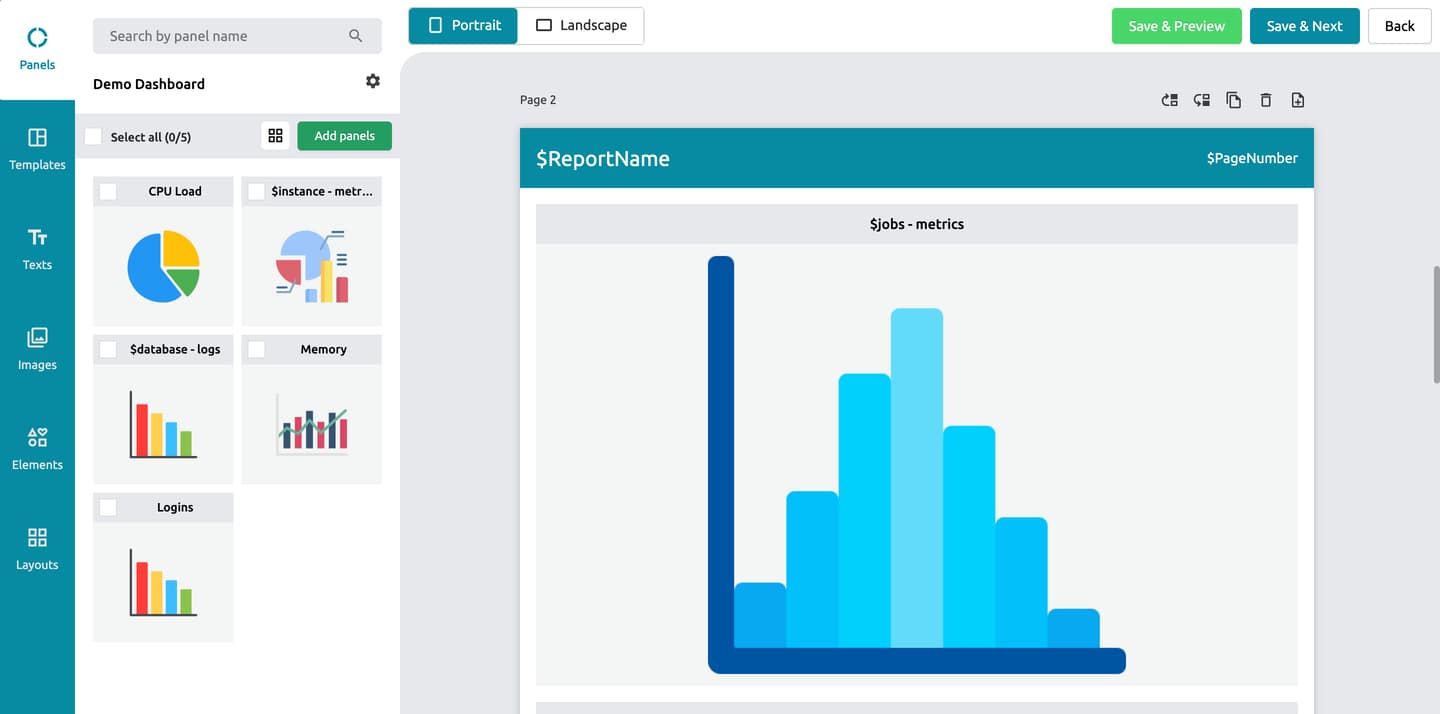
DataViRe is a purpose-built Grafana reporting tool. It fills the gaps left by native reporting. It works with Grafana OSS, Cloud, and Enterprise. So, no extra Grafana licence is needed to make and send reports.
DataViRe works at the reporting layer. It never needs to touch your dashboards. It takes the data you already have in Grafana and turns it into scheduled, formatted files. The whole process also runs on its own without changing your dashboard setup.
Core Reporting Capabilities
At a basic level, DataViRe supports:
- Exports to PDF, Excel (XLSX), and CSV - covering both clean reports and data-heavy ones
- Accurate rendering of charts, tables, and dashboard layouts
- Grafana variable support - filtered, personal reports from a single dashboard
- Multi-dashboard reporting - combine many related views into one report.
As a result, DataViRe suits internal team reporting, leader summaries, and client work.
Automation, Delivery, and Operational Fit
The biggest real difference between DataViRe and native Grafana reporting is depth of automation.
Reports can be:
- Scheduled hourly, daily, weekly, or monthly
- Made on their own with no manual trigger
- Sent through many channels:
- Slack
- Microsoft Teams
As a result, reports land where people already work. No one needs to log into Grafana or check a separate inbox. This cuts manual export work. It also cuts missed reports and removes the need for engineering help on routine tasks.
Deployment and Cost Considerations
DataViRe sits beside your current Grafana setup with no disruption. Key points:
- No Grafana Enterprise licence is needed. This drops a major cost barrier for OSS teams.
- It works with your current dashboards. So, no rework is needed.
- It can roll out by team or use case. This makes the switch slow and low-risk.
For OSS teams, this means you skip the need to justify a full Enterprise upgrade just for reporting. For Enterprise users, it fills the gaps where native reporting falls short. In both cases, it cuts overhead instead of adding to it.
Native Grafana vs DataViRe: Side-by-Side Comparison
The core gap between native Grafana reporting and DataViRe is not whether reports get made. Instead, it is about how well reporting fits into your daily work. The table below shows the real gaps teams hit once reporting becomes routine.
| Feature | Native Grafana Reporting | DataViRe |
|---|---|---|
| PDF export | ||
| Excel (XLSX) export | ||
| Automated scheduling | Basic | Advanced |
| Branding & layout control | Limited | Limited |
| Delivery channels | Email only | Email, Slack, Teams, WhatsApp |
| Enterprise license | Expensive ($30k approx/year) | Budget-friendly |
Choose Native Grafana If: You already use Grafana Enterprise or Cloud. Your reporting needs stay internal only. PDF exports are enough. Email delivery meets your team's needs too. | Choose DataViRe If: You use Grafana OSS, need Excel exports, or send reports to clients and outside teams. It is also the right pick if you need many delivery channels. The same goes for automation that doesn't depend on Grafana's licence tier. | |
The main gap is operational flexibility. Native reporting ties tightly to Grafana's licence and feature set. Third-party tools, however, split reporting from visuals. As a result, teams can scale reporting no matter how they run Grafana.
Which Grafana Reporting Tool Is Right for Your Use Case?
There is no single right answer here. The best tool depends on how your team works, not a list of features.
When Native Grafana Reporting Is Enough
Built-in reporting works well when:
- You’re already using Grafana Enterprise or Grafana Cloud, and reporting comes with your plan
- Reporting stays internal and doesn't need outside branding.
- Standard PDF exports satisfy your stakeholders.
- Email delivery is enough for your team.
- Report frequency stays fairly low.
In these cases, adding a third-party tool adds work you don't need.
When to Choose DataViRe
A third-party Grafana reporting tool is the right pick when:
- You run Grafana OSS
- Excel (XLSX) is needed for finance, compliance, or audits.
- Reports go to clients, partners, or outside stakeholders.
- Full automation is a must.
- Custom branding is needed for client-facing reports.
- Reports need to reach Slack, Teams, or WhatsApp.
At this point, reporting is no longer a side task. Instead, it is how your team shows value and builds trust. As needs grow, tools built just for Grafana reporting handle this far better.
Final Thoughts
Overall, Grafana dashboards are great for watching and exploring live data. But a dashboard is not a report. In fact, charts help you explore data. They don't, however, tell a clear story you can easily share. Turning that data into a scheduled file is a different task. So, it needs a different kind of tool.
As teams grow, reporting becomes how results get shared. It's also how choices get made. The right question is not "Does Grafana have a reporting feature?" Instead, ask: "Can we trust our reports at the scale our team needs?"
The official Grafana documentation is the best guide for what Grafana can do on its own. It also helps show where built-in tools stop. From there, a dedicated Grafana reporting tool takes over.
Frequently Asked Questions
How can I send Grafana reports if I use the open-source (OSS) version?
Native reporting only works for Enterprise and Cloud users. But DataViRe links to your Grafana OSS setup through an API key. So, you can build and schedule reports without a licence upgrade.
Is there a way to export Grafana dashboards to Excel?
Standard Grafana only supports PDF and CSV. If your team needs Excel (XLSX) files for finance or audits, DataViRe handles that export for you.
What is the difference between SLA monitoring and SLA reporting?
Monitoring works in real time. Dashboards spot issues as they happen. Reporting, however, looks back. It turns that data into a record for audits, reviews, and client talks.
Can I send reports from Grafana to Slack or Microsoft Teams?
Native Grafana reporting only covers email. But DataViRe sends reports straight to Slack, Microsoft Teams, and WhatsApp through built-in links.
Can I add custom branding to Grafana reports?
Almost no native branding options exist. But DataViRe offers a full white-label option. You can add your own logos, colours, and layouts to client-facing reports.
Can I send scheduled Grafana reports to people who don't have a Grafana account?
Yes. Native Grafana share links require a login or VPN access. DataViRe, on the other hand, sends plain PDF or Excel files. So, clients and leaders can view reports without ever needing a Grafana account.