Grafana Reporting Tools Compared (2026): Native Grafana vs Third-Party Solutions
Grafana Reporting Tools Compared: What This Guide Covers
Professional Grafana reporting is vital for modern teams. Initially, many think dashboards are enough for every task. This approach works for fast fixes, but scaling firms need more than live charts. Specifically, stakeholders want static reports to track performance. So, relying on manual data checks creates a major bottleneck.
It's also challenging to share data outside of engineering teams. For example, bosses rarely log into Grafana to check small charts. Similarly, clients often find filters too complex to use. Auditors also reject screenshots as real proof. At that point, dashboards do not provide a comprehensive view. Consequently, automated Grafana reporting becomes a must for your business.
This scenario is where specialised Grafana reporting tools help. These tools turn live data into clean files automatically. Therefore, everyone gets the right data at the right time. Choosing the best tool is no longer just a tech task. Instead, it is a key move for your whole team.
This guide compares Grafana reporting tools available in 2026, focusing on the two realistic approaches teams can take today:
- Native Grafana reporting, available in Grafana Enterprise and Grafana Cloud
- Third-party Grafana reporting tools that extend reporting to Grafana OSS, Cloud, and Enterprise
We compare tools based on automation, file types, and costs. We also look at real-world limits. Our goal is not to sell features. Instead, we want to help you find a Grafana reporting tool that works well for your team.
Grafana Reporting Requirements in Real-World Teams
Reporting issues rarely show up when you first start with Grafana. Instead, they grow slowly as your team expands and needs change.
Dashboards work well at first. Engineers log in, check data, and fix issues right in Grafana. If someone needs an update, a quick screenshot or screen share does the job.
That path fails fast once you need to send reports often. Specifically, it stops working when you must share data with clients or outside teams.
Most teams move through three predictable stages.
Early Stage: Manual and Reactive
At this stage, Grafana reporting looks like:
- Pasting screenshots into emails or slides.
- Saving quick PDF files before a meeting.
- Answering manual requests to send data again.
This path works only when you have very few reports. However, as you do this task more often, it leads to errors. Consequently, you waste too much time. You need a better way to handle Grafana reporting as your workload grows.
Growth Stage: Scheduled and Repeatable
As teams grow, Grafana reporting becomes a habit:
- Weekly summaries of how things run.
- Monthly reviews of your best work.
- On-time updates for your leads.
At this stage, you must use automation. Manual tasks no longer work. Specifically, missed files and incorrect data start to hurt your choices. Therefore, you need solid Grafana reporting to keep your facts right and save time.
Scale Stage: Auditable and Client-Facing
At scale, Grafana reporting is more than just talking to your team. It becomes a core part of how your business runs. For example, you need it for:
- SLA and compliance documentation
- Client-facing performance reports
- Historical archives for audits and reviews
Therefore, your system must deliver consistent, branded, traceable, and reproducible reports at this stage. Dashboards alone cannot meet these requirements.
Across all three stages, serious teams need a few key things:
- Hands-free work: Reports should go out on a schedule without any human help.
- File types that work: Both PDF and Excel files are a must for people who do not use Grafana.
- Total control: You need to set exact time ranges and pick the right variables every time.
- A clean look: Every report should follow the same layout so it looks professional.
- Steady delivery: The system must work on its own so you do not have to call an engineer to fix it.
Consequently, unmet needs transform reporting into technical debt. Engineers spend time exporting instead of building, and decision-makers lose trust in the data because reports arrive late or look inconsistent.
In fact, organisations will eventually bypass or replace any Grafana reporting tool that fails to address these realities.
Native Grafana Reporting (Enterprise & Cloud)
Grafana has built-in tools, but not everyone can use them. In fact, the company limits native Grafana reporting to its cloud and enterprise plans. Consequently, teams using the free OSS version have no way to create reports within the app. Therefore, those users must look for other ways to share their data.
This choice matters because many teams pick the free version to save money. In fact, for these users, native Grafana reporting is not just a "limited choice". It simply does not exist at all. Therefore, they must find another way to send their data.
However, even on paid plans, native Grafana reporting only handles basic tasks. It works well for your team, but it fails for complex client needs. Specifically, it lacks the power for custom layouts or advanced workflows. To accomplish your objectives, you might still require a better tool.
Key Features of Native Grafana Reporting
Native Grafana reporting offers a small but useful set of tools:
- Create PDF exports: This tool turns dashboards into static files. Specifically, it helps you give summaries to your team or keep old records.
- Set up email schedules: Reports go out every day, week, or month on their own. Consequently, your team gets data on time without any extra work.
- Control user access (RBAC): The app uses roles to limit who can see what. Furthermore, this keeps your private data safe from the wrong eyes.
- Download CSV data: You can pull raw numbers from tables into a spreadsheet. Therefore, your team can run their own tests in other tools.
- Pick your time range: You can set reports to show a specific day or a relative window. Specifically, this lets you show the exact trends your boss wants to see.
- Use dashboard variables: The tool uses filters to show different views of the same data. As a result, you can send custom reports without building new dashboards.
For teams on paid plans, these features handle simple tasks without the need for extra software.
Limitations You’ll Hit in Practice
In the real world, native Grafana reporting has many limits. Specifically, teams often hit these walls:
- OSS users are left out: The free version has no reporting at all. Consequently, these teams must look elsewhere for a fix.
- Excel files are missing: You cannot export to XLSX. Furthermore, plain CSV files are rarely enough for finance or legal teams who need real spreadsheets.
- Branding is weak: You have very little control over the look. For instance, you cannot change headers or colours to match your brand, making reports look generic.
- Delivery is stuck in email: There is no built-in way to send files to Slack or Teams.
- Snapshots lack life: Reports are just static images. Finally, they do not adapt well and offer very few ways to personalise the data.
Therefore, these gaps can stall a professional Grafana reporting plan. As a result, many teams outgrow the built-in tools much faster than they expected.
Pricing & Licensing Reality
Specifically, Grafana includes native reporting within Enterprise and Cloud plans. This means:
- Consequently, users cannot purchase reporting independently from a full plan.
- Costs scale with licensing tiers, not reporting usage.
- Smaller teams often pay for features they don’t fully need.
For teams on paid plans, native Grafana reporting might be enough. However, for those using the free version, the cost is often too high. Consequently, the price-to-value ratio pushes many teams toward other tools. Specifically, they find that third-party options offer more for less money.
Third-Party Grafana Reporting Tools
Grafana reporting tools from third parties exist for one simple reason: native tools often fail in the real world. Specifically, professional teams move to these tools when:
- They use the free OSS version and have no other way to make reports.
- Basic PDFs are not enough, and they need more flexible file types.
- Polished, branded files are required for clients or managers who do not use Grafana.
- Trust and speed are more important than just having a "simple" fix.
Ultimately, third-party Grafana reporting is more than just an extra feature. Instead, it is the only way to make your data work for your business. Therefore, moving to a better tool is a vital step for any team that cares about professional delivery.
When Native Reporting Falls Short
Teams look for new tools when their Grafana reporting needs grow. Specifically, you may reach this point when:
- Reporting volume increases and manual exports become a bottleneck
- Reports must be delivered to multiple recipients with different views
- Excel files are required instead of raw CSV data
- Reports need consistent branding for clients or leadership
- Delivery must happen through collaboration tools, not just email
At this point, reporting shifts from an occasional task to a repeatable operational workflow. Native tools are rarely designed for that level of complexity.
What to Look for in External Grafana Reporting Tools
Not all third-party tools are built for production use. A serious Grafana reporting tool should provide the following:
- Multiple export formats, including PDF, Excel (XLSX), and CSV
- Flexible scheduling, without relying on manual triggers
- Variable-driven personalization, so one dashboard can produce many reports
- Stable rendering, preserving dashboard layout and visuals
- Multiple delivery channels, beyond email
- Minimal dependency on Grafana licensing, especially for OSS users
Tools that rely on browser automation, screenshots, or brittle scripts often fail silently and create operational risk.
Common Mistakes Teams Make When Choosing Reporting Tools
Teams frequently make avoidable mistakes during evaluation:
- Choosing tools that work well in demos but fail under real load
- Ignoring delivery reliability and error handling
- Underestimating the importance of formatting and branding
- Locking themselves into Enterprise upgrades they don’t actually need
These mistakes usually surface months later, when reporting expectations are already set and changing tools becomes expensive.
A good third-party Grafana reporting tool should reduce operational overhead, not introduce another system that needs constant babysitting.
DataViRe Overview (A Third-Party Grafana Reporting Tool)
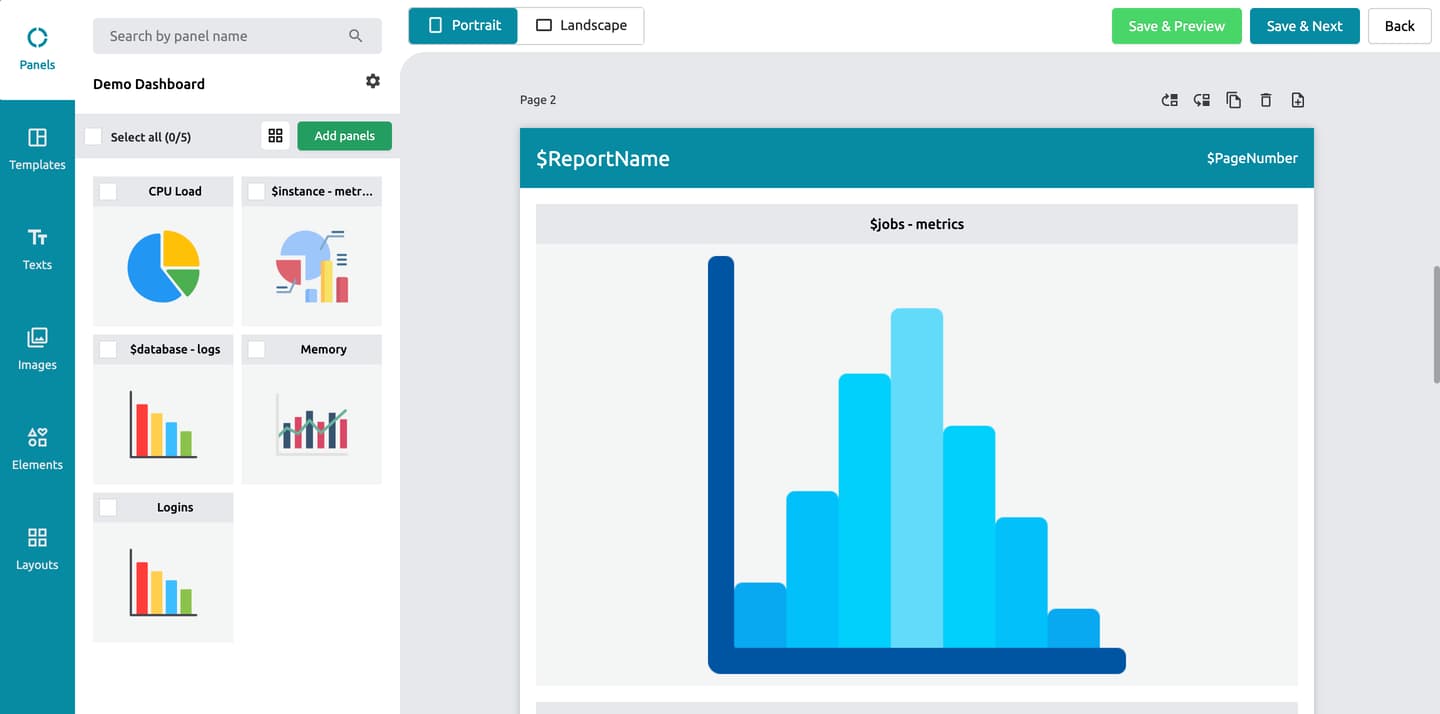
DataViRe is a third-party tool made to fix the gaps in native Grafana reporting. It works with the free OSS version, cloud, and enterprise plans alike. Specifically, you do not have to pay for a new licence just to send out a report.
Rather than changing your dashboards, this tool focuses on the reporting layer itself. It turns your data into files that you can send out like clockwork. This distinction matters because most issues are not about how your charts look. Instead, the real pain points are automation, delivery, and keeping your facts straight.
Core Reporting Capabilities
At a functional level, DataViRe supports:
- PDF, Excel (XLSX), and CSV exports, covering both presentation and data-heavy use cases
- Accurate rendering of charts, tables, and dashboard layouts
- Support for Grafana variables, enabling filtered and personalized reports
- Multi-dashboard reporting, allowing teams to bundle related views into a single report
These capabilities make it suitable for internal teams, management reporting, and external client deliverables.
Automation, Delivery, and Operational Fit
Where DataViRe differs most from native reporting is in automation depth.
Reports can be:
- Scheduled at hourly, daily, weekly, or monthly intervals
- Generated without manual triggers
- Delivered automatically through multiple channels, including:
- Slack
- Microsoft Teams
This allows reports to fit naturally into existing communication workflows instead of forcing stakeholders to change how they consume information.
From an operational standpoint, this reduces:
- Manual export work
- Missed or delayed reports
- Dependency on engineers for routine reporting
Deployment and Cost Considerations
In terms of implementation, DataViRe is designed to be introduced alongside existing Grafana setups without any disruption to your current workflow. Specifically, it offers a streamlined path to professional Grafana reporting through several key advantages:
- No Grafana Enterprise license is required, which significantly reduces operational overhead.
- Furthermore, it works seamlessly with your existing dashboards, meaning no rework is necessary.
- In addition, the platform can be rolled out incrementally by team or specific use case to ensure a smooth transition.
Consequently, for organisations running Grafana OSS, this removes the need to justify a full enterprise upgrade purely for Grafana reporting features. Similarly, for enterprise users, it provides much-needed flexibility in areas where native reporting falls short. Therefore, DataViRe acts as both a cost-saving measure and a powerful technical extension for any observability stack.
Native Grafana vs DataViRe: Side-by-Side Comparison
At a high level, the primary difference between native options and third-party tools like DataViRe does not involve mere report generation. Instead, the real distinction lies in how reliably and flexibly Grafana reporting fits into your daily operations. Consequently, choosing a tool is less about the output and more about how effectively the system automates your workflow.
The table below summarises the practical differences teams encounter once reporting becomes routine.
| Feature | Native Grafana Reporting | DataViRe |
|---|---|---|
| PDF export | ||
| Excel (XLSX) export | ||
| Automated scheduling | Basic | Advanced |
| Branding & layout control | Limited | Limited |
| Delivery channels | Email only | Email, Slack, Teams, WhatsApp |
| Enterprise license | Expensive ($30k approx/year) | Budget-friendly |
Choose Grafana If: You already run Grafana Enterprise or Grafana Cloud. You don’t require Excel exports, advanced branding, or multiple delivery channels. | Choose DataViRe If: You use Grafana OSS or want to avoid Enterprise licensing. You use Grafana OSS or want to avoid Enterprise licensing. Reporting is business-critical, client-facing, or compliance-driven. You need greater control over layouts, branding, and reliability. | |
Looking beyond the table, the trade-offs become clearer in practice.
Native Grafana reporting works best when:
- Reporting needs are simple and internal
- PDF exports are sufficient
- Email delivery meets stakeholder expectations
It struggles as soon as reporting needs expand beyond that narrow scope.
DataViRe, on the other hand, is designed for environments where:
- Grafana OSS is in use
- Excel exports are required
- Reports must be delivered automatically across teams or clients
- Reporting volume and consistency matter
The key difference is operational flexibility. Native reporting is tightly coupled to Grafana licensing and feature scope. Third-party tools decouple reporting from visualization, allowing teams to scale reporting independently of how they deploy Grafana.
Which Grafana Reporting Tool Is Right for Your Use Case?
No single tool is the best for Grafana reporting. The right choice depends on your daily workflow rather than a list of features. Specifically, you must pick a tool that fits how your team actually works.
When to Use Native Grafana Reporting
Native Grafana reporting usually works well if you have basic needs. For instance, you might find the built-in features enough when:
- You already use Grafana Enterprise or Grafana Cloud, meaning the features are already accessible.
- Furthermore, your reporting needs are strictly internal-only and do not require external branding.
- Additionally, standard PDF reports fully meet your stakeholder expectations without the need for Excel.
- Moreover, simple email delivery is considered an acceptable communication channel for your team.
- Finally, your overall reporting frequency remains relatively low.
Native Grafana reporting keeps your setup simple. You do not need to add extra tools. Consequently, this path works well for small teams with basic needs. However, as you grow, you may need more power. At that point, you should look at external tools to handle complex tasks.
Choose DataViRe If:
A third-party Grafana reporting tool is the best choice when:
- You use the free OSS version.
- Excel (XLSX) files are a must for finance or audits.
- Sharing data with clients or outside partners is part of your daily routine.
- Full automation is required so you can trust the results.
- Custom branding is needed to give your reports a clean, pro look.
- You send reports to Slack or Microsoft Teams.
In these cases, reporting is no longer a side task. Instead, it is how your team shows its value and builds trust. Tools made just for Grafana reporting handle these needs much better as you grow.
Final Thoughts
Grafana dashboards work great for finding bugs and looking at live data. However, a dashboard is not the same thing as a report. While charts help you explore, they often fail when you need to share a clear story. Therefore, you must turn that data into a solid file to make it useful for others.
As teams grow, they need reports to show results and make better choices. Ultimately, the real question is how much control and speed you need from your data.
Many teams need more than just a quick file export. Instead, they look for ways to make their work repeat itself without any extra help. If you need to send files like clockwork, especially in PDF form, you should check out our guide on automated Grafana PDF reports. There, we break down the best tools and ways to handle that task. Ultimately, this help will save you time and keep your data moving.
This guide shows that native Grafana reporting handles basic tasks well. However, third-party tools provide the extra power that teams need. Specifically, these tools help Grafana OSS users and client teams who need better control and more options.
To learn more about how dashboards and variables work, you should check the official Grafana site. Specifically, reading the help grafana documentation gives you context on what the app can do. Consequently, this helps you see where built-in tools end and where Grafana reporting tools must take over.
Frequently Asked Questions
How can I send Grafana reports if I use the open-source (OSS) version?
Since native reporting is restricted to enterprise and cloud users, you can use DataViRe to generate and schedule professional Grafana reporting documents using your API keys.
Is it possible to export Grafana dashboards to Excel?
Standard Grafana only supports PDF and CSV. However, if your finance team needs Excel (XLSX) files for data analysis, DataViRe is the best solution to automate these spreadsheet exports.
What is the main difference between SLA monitoring and SLA reporting?
Monitoring is about the "now", using dashboards to catch live issues. In contrast, reporting is about the big picture, turning that data into a polished document for audits and legal compliance.
Can I send a Grafana email report directly to Slack or Microsoft Teams?
Native reporting is limited to email. However, you can use DataViRe to deliver visual PDF or Excel reports into Slack, Teams, or WhatsApp through its built-in integrations.
Can I add my own branding to my Grafana reporting?
The native options are very limited. Instead, DataViRe offers a full white-labelling suite, letting you add your own logos and colours so your client-facing reports look professional.
Can I send a scheduled Grafana email report to people without an account?
Yes. Unlike native share links that require a login or VPN access, DataViRe sends standalone PDF or Excel files. Consequently, clients and executives can view critical data without ever needing a Grafana account.